Introduction
Kubernetes has become a standard platform for deploying and managing modern applications. However, running Kubernetes in an enterprise environment involves more than creating a cluster and deploying containers. Infrastructure teams must also consider compute capacity, virtual machine placement, networking, persistent storage, security, access control, availability, and lifecycle management.
This is where VMware Cloud Foundation (VCF) and VMware vSphere Kubernetes Service (VKS) fit into the picture.
VKS enables platform teams to provision and manage Kubernetes clusters on the vSphere infrastructure through declarative APIs. Rather than treating Kubernetes as a separate platform that must be independently built and maintained, organizations can integrate cluster provisioning and operations with the broader private-cloud environment.
For infrastructure engineers, this means Kubernetes clusters can be managed alongside familiar infrastructure resources and policies. For Kubernetes platform engineers, it provides a way to request clusters, define node pools, configure supported networking and storage, and manage workloads through Kubernetes-oriented workflows.
Understanding this architecture requires looking beyond the Kubernetes API itself. We need to understand how the vSphere Supervisor, Cluster API, Virtual Machine Service, VKS clusters, and underlying infrastructure interact.
In this article, we will explore the architecture of VKS on VMware Cloud Foundation 9.1, follow the cluster provisioning workflow, examine the relationship between the Supervisor and workload clusters, and use practical commands to inspect an existing environment.
The goal is to understand not only what the components do, but also why they exist and how they fit into an enterprise Kubernetes platform.
Table of Contents
- What Exactly Is VKS?
- Why VKS Nodes Run as Virtual Machines
- Supervisor vs. VKS Cluster
- Cluster API and Declarative Lifecycle
- What Happens When a VKS Cluster Is Created?
- VKS Release Architecture
- Hands-On Lab: Explore an Existing VKS Environment
- Troubleshooting and Validation
- Key Takeaways
- What I Learned
- Continue the Series
1. What Exactly Is VKS?
VMware vSphere Kubernetes Service is the Kubernetes cluster service integrated into the VMware Cloud Foundation private-cloud platform. It allows authorized consumers to declaratively create, configure, and manage Kubernetes clusters while using platform-managed infrastructure capabilities.
To understand VKS, we need to examine the individual components and how they work together.
VMware Cloud Foundation
VMware Cloud Foundation provides the broader private-cloud platform in which compute, storage, networking, and management services operate together.
From a Kubernetes perspective, VCF supplies the infrastructure and platform services required to host and operate clusters. These include the underlying vSphere compute environment and the configured networking, storage, identity, and operational controls.
VCF 9.1 also extends VKS scalability and operational capabilities, including support for up to 500 Kubernetes clusters per Supervisor. Actual capacity and supported configurations still depend on the applicable product requirements and environment design.
The important architectural distinction is that VCF provides the overall private-cloud foundation, while VKS provides the Kubernetes cluster provisioning and management experience within that foundation.
vSphere
vSphere provides the virtualization layer on which the infrastructure operates.
Its responsibilities include hosting virtual machines, allocating compute resources, connecting workloads to virtual networking, and integrating with supported storage configurations.
For VKS, the control-plane and worker-node machines are provisioned as virtual machines. This allows Kubernetes infrastructure to use the resource management and operational capabilities of the underlying vSphere environment.
From an infrastructure engineer’s perspective, vSphere remains a central management layer. From a Kubernetes engineer’s perspective, it provides the compute environment in which the cluster nodes run.
vSphere Supervisor
The vSphere Supervisor provides the Kubernetes-oriented management layer through which supported services and workload clusters are consumed.
It exposes APIs and controllers that allow authorized users to request platform resources declaratively. Cluster lifecycle operations can then be coordinated through the relevant platform components rather than requiring administrators to manually create every node VM.
The Supervisor also provides the context in which vSphere Namespaces, resource allocations, permissions, and supported services are managed.
Think of the Supervisor as the management foundation for the VKS clusters running on the platform. It is not the same thing as an application team’s workload cluster.
vSphere Kubernetes Service
VKS is the service used to provision and manage Kubernetes workload clusters.
A cluster definition describes the intended configuration, which may include:
- Kubernetes release version.
- Control-plane topology.
- Worker-node pools and replica counts.
- Virtual machine classes.
- Storage configuration.
- Supported networking settings.
VKS uses Cluster API-based lifecycle management and the relevant platform services to turn this desired configuration into running infrastructure. It also supports lifecycle operations such as scaling and upgrades, subject to the selected release and configuration.
This creates a useful separation: the platform team establishes the available infrastructure and policies, while authorized cluster consumers work with the Kubernetes environments provided to them.
VKS Cluster
A VKS cluster is the Kubernetes environment provisioned for a workload or application platform.
It contains a Kubernetes control plane and worker nodes. The control plane manages Kubernetes API operations and cluster state, while worker nodes run the application pods scheduled onto them.
Depending on the cluster’s configuration, the environment also uses networking, storage, and cloud integration components.
A workload cluster provides the familiar Kubernetes API and resource model used by platform and application teams. Its internal Kubernetes namespaces, deployments, services, pods, and other resources are distinct from the vSphere Namespace used to allocate and govern platform resources.
Kubernetes Control Plane and Worker Nodes
The control plane and worker nodes have different responsibilities.
Control-plane nodes
These host Kubernetes control-plane components responsible for the API, cluster state, scheduling, and coordination. In a highly available configuration, multiple control-plane nodes can help maintain availability during certain node failures, provided quorum and the rest of the infrastructure remain healthy.
Worker nodes
These provide the compute capacity for application workloads. They run the components needed to host pods and participate in the Kubernetes cluster. Worker pools can be sized and scaled according to workload requirements and supported cluster configuration.
Separating these responsibilities makes it easier to plan capacity and reason about application scheduling, cluster availability, and operational boundaries.
vSphere Namespaces
A vSphere Namespace is a platform-level boundary through which administrators can allocate and govern resources for authorized consumers.
Depending on the environment, its configuration can include permissions, resource limits, storage policies, virtual machine classes, and access to supported services.
A Kubernetes Namespace inside a VKS workload cluster serves a different purpose: it organizes Kubernetes resources such as pods, deployments, and services within that cluster.
These two concepts should not be confused.
| Area | vSphere Namespace | Kubernetes Namespace |
|---|---|---|
| Primary purpose | Platform resource allocation and governance | Organization of resources inside a Kubernetes cluster |
| Managed through | vSphere platform interfaces and APIs | Kubernetes API |
| Typical resources | Permissions, quotas, VM classes, storage policies | Pods, deployments, services, secrets |
| Main responsibility | Platform administration | Cluster and application administration |
The exact permissions and resource controls available depend on the deployed VCF configuration. The separation between platform-level governance and workload-level resource organization is a core architectural concept.
Cluster API
Cluster API, commonly abbreviated as CAPI, provides a declarative approach to Kubernetes cluster lifecycle management.
Instead of treating a cluster as a collection of virtual machines that must be manually created and maintained, Cluster API represents the desired cluster configuration through Kubernetes API resources.
Controllers observe those resources and work to reconcile the actual environment with the requested state.
In a VKS environment, this model supports cluster provisioning and lifecycle operations through the integrated platform services. The precise resource versions, topology classes, and API fields depend on the VKS release being used.
We will return to this reconciliation process in Section 4.
Virtual Machine Service
Virtual Machine Service, or VM Service, provides a declarative API for deploying and managing virtual machines within the VCF private-cloud environment. It supports YAML-based VM definitions and operates within the platform’s configured administrative controls.
In the VKS architecture, VM Service is relevant to understanding how virtualized infrastructure is consumed through platform APIs.
However, it is important not to assume that every VKS node is independently created by an administrator through the standalone VM Service workflow. VKS cluster provisioning follows its own supported lifecycle and controller integration, and the precise responsibilities of the participating components should be verified against the deployed release.
vSphere Kubernetes Release (VKr)
A vSphere Kubernetes Release, or VKr, represents a supported Kubernetes release made available through the VKS platform.
The selected release determines which Kubernetes version and associated platform-provided components are available for a cluster. Release compatibility and lifecycle support are therefore important parts of cluster design.
A VKr should not be treated as interchangeable with the VCF platform version. Kubernetes workload clusters have their own release and upgrade considerations within the broader infrastructure lifecycle.
We will examine this separation in more detail in Section 6.
2. Why VKS Nodes Run as Virtual Machines
One of the important architectural choices in VKS is running Kubernetes nodes as virtual machines on vSphere.
This approach connects Kubernetes cluster management with established infrastructure management capabilities. It also provides a consistent way to allocate compute resources, apply placement policies, and manage the infrastructure supporting cluster nodes.
The following considerations explain why this design matters.
Hardware-Level Isolation
Virtual machines provide isolation boundaries between guest operating systems and the underlying hypervisor.
For Kubernetes, this means the operating systems hosting the control plane and worker nodes run within their own VM boundaries rather than directly as processes on the ESXi host.
This separation can help isolate workloads and simplify infrastructure governance. However, VM isolation does not eliminate the need for Kubernetes security controls, operating-system hardening, identity management, network policies, or appropriate host security.
Security must be considered across the complete stack.
vSphere HA and DRS
vSphere High Availability (HA) and Distributed Resource Scheduler (DRS) are relevant to the infrastructure hosting VKS node VMs.
- vSphere HA can restart eligible virtual machines on surviving hosts following certain host failures, provided the cluster and its resources are configured appropriately.
- DRS helps manage virtual-machine placement and resource distribution across the vSphere cluster according to its configuration and policies.
These capabilities support infrastructure availability and resource management. They do not replace Kubernetes health checks, application-level redundancy, or Kubernetes control-plane quorum requirements.
For example, a worker VM restarting after an ESXi host failure does not automatically guarantee that every application request succeeds without interruption. Application replicas, scheduling constraints, persistent storage behavior, and network availability also affect recovery.
Reusable VM Classes
Virtual machine classes provide predefined compute configurations that can be made available to authorized consumers.
Depending on the supported configuration, these classes define characteristics such as CPU and memory allocation. They allow platform teams to offer consistent sizing options without requiring every application team to design virtual-machine specifications independently.
This is useful when different teams have different workload requirements.
For example:
- A small development workload may need a modest worker-node configuration.
- A memory-intensive application may require a larger memory allocation.
- A compute-intensive workload may need a dedicated node pool with appropriate resource sizing.
Actual VM class names, available sizes, and resource behavior must be confirmed in the environment.
Resource Governance
Enterprise Kubernetes platforms must balance self-service access with shared infrastructure capacity.
VMware platform controls can help administrators allocate CPU, memory, storage, and access according to organizational requirements. Within the workload cluster, Kubernetes resource requests, limits, quotas, and scheduling policies address a different but related set of concerns.
Both layers matter.
A Kubernetes deployment can request more resources than the underlying infrastructure can practically provide. Similarly, a namespace or VM allocation can restrict capacity even when an application team has configured its Kubernetes manifests correctly.
Effective capacity planning therefore requires understanding both the Kubernetes resource model and the vSphere resource allocation model.
GPU and Accelerator Integration
Some modern workloads require GPUs or other hardware accelerators, including AI inference, model development, scientific computing, and specialized data processing.
Virtualized environments may support accelerator-backed workloads through appropriate hardware, software, VM configuration, and platform support. However, accelerator availability is not guaranteed simply because a Kubernetes node runs as a VM.
Before designing a GPU-enabled VKS environment, verify:
- Hardware and ESXi compatibility.
- Supported GPU or accelerator configuration.
- VM allocation and device-access requirements.
- Guest operating-system and driver compatibility.
- Kubernetes scheduling and device-plugin requirements.
- Applicable VKS and VCF support limitations.
These checks help ensure that the architecture reflects a supported deployment rather than an assumed capability.
Operational Consistency
Using virtual machines as Kubernetes nodes creates a consistent infrastructure management model.
Platform administrators can work with established vSphere operations and policies, while Kubernetes administrators continue to use Kubernetes tools and APIs for cluster and application management.
This consistency becomes particularly valuable when an organization operates many clusters across development, testing, and production environments.
Instead of inventing a separate infrastructure process for every cluster, teams can build repeatable provisioning, validation, monitoring, and lifecycle workflows around supported platform interfaces.
The objective is not to remove every operational responsibility. It is to establish a predictable division of responsibilities between infrastructure management and Kubernetes operations.
3. Supervisor vs. VKS Cluster
Understanding the distinction between the Supervisor and a VKS workload cluster is essential when designing permissions, troubleshooting provisioning issues, and defining operational ownership.
They are related parts of the same platform, but they do not perform identical jobs.
The Supervisor: Platform-Level Management
The Supervisor provides the platform-level API and management context used to consume supported services and provision workload clusters.
Platform administrators are generally responsible for establishing and maintaining the underlying environment, including:
- Configuring the supported Supervisor deployment.
- Preparing compute, networking, and storage.
- Establishing namespace-level resource allocations.
- Defining access permissions and governance boundaries.
- Making supported VM classes, storage options, and Kubernetes releases available.
- Monitoring platform health and capacity.
These responsibilities vary according to the organization’s operating model and delegated administrative permissions.
The VKS Cluster: Workload-Level Kubernetes
A VKS cluster provides the Kubernetes environment in which platform teams or application teams deploy and manage workloads.
Depending on their assigned permissions, cluster consumers may be responsible for:
- Managing Kubernetes namespaces.
- Deploying applications and services.
- Configuring application replicas and resource requests.
- Applying Kubernetes access controls.
- Managing supported cluster-level add-ons.
- Monitoring pod health and application availability.
- Testing applications before and after cluster upgrades.
These tasks take place within the workload cluster and are separate from administering the underlying vSphere platform.
How the Two Layers Work Together
Consider a development team that needs a Kubernetes environment for a new application.
The platform administrator first ensures that the Supervisor, namespace, resource allocations, access permissions, and supported configuration are ready. An authorized consumer then requests a VKS cluster using the supported cluster management workflow.
The platform controllers coordinate the requested provisioning process. After the cluster becomes available, the development team can use its Kubernetes API to deploy workloads within the permissions granted to it.
The application team does not need unrestricted access to vCenter simply to deploy an application.
This separation supports a self-service operating model while retaining infrastructure governance.
Supervisor vs. VKS Cluster: Design Decision Table
| Area | Supervisor | VKS cluster |
|---|---|---|
| Primary role | Platform-level management and service consumption | Workload-level Kubernetes |
| API context | Supervisor and platform APIs | Workload cluster Kubernetes API |
| Main resources | vSphere Namespaces and platform-managed resources | Pods, deployments, services and Kubernetes resources |
| Infrastructure dependency | Underlying vSphere platform | Supervisor and provisioned node infrastructure |
| Typical administrator | vSphere/platform administrator | Kubernetes/platform or application administrator |
| Main operational focus | Governance, resource availability, provisioning | Application scheduling, cluster configuration and workload health |
Architectural takeaway: The Supervisor provides the management foundation; the VKS cluster provides the Kubernetes environment consumed by workload teams.
Neither layer should be treated as a replacement for the other.
4. Cluster API and Declarative Lifecycle
Cluster API is central to understanding how VKS cluster provisioning and lifecycle management work.
Traditional VM provisioning often involves a series of infrastructure tasks: creating virtual machines, configuring their resources, installing operating systems, preparing networking, and integrating the machines with the required software.
A declarative cluster management model changes the interaction. Instead of manually performing every infrastructure operation, an authorized consumer describes the desired cluster configuration and submits it through the supported API.
The platform’s controllers then work toward that desired state.
Desired-State Cluster Objects
A declarative specification describes what the cluster should look like rather than providing only a sequence of manual instructions.
For example, a cluster definition may specify:
- A supported topology class.
- A supported Kubernetes release.
- Three control-plane replicas.
- A worker pool with three replicas.
- An approved VM class.
- A supported storage configuration.
- The required networking configuration.
The exact schema depends on the VKS and Cluster API versions in use.
The following is a conceptual illustration, not a validated VCF 9.1 deployment manifest:
# Conceptual example only — not ready to apply.
# Replace with a manifest validated for your exact VKS release.

cluster:
  name: production-vks01

  kubernetes:
    release: "<supported-vkr-release>"

  controlPlane:
    replicas: 3

  workers:
    pools:
      - name: general-workers
        replicas: 3

  infrastructure:
    vmClass: "<approved-vm-class>"
    storageClass: "<approved-storage-class>"
This example illustrates the desired configuration in simplified form. The cluster structure shown here is pseudocode, not the actual Kubernetes Cluster API schema.
In a real environment, the specification must use the correct API version, supported topology class, configuration variables, and fields documented for that release. The official VKS API reference is the appropriate starting point for building a valid manifest.
VKS Controllers
Controllers are responsible for observing relevant API resources and coordinating the operations needed to achieve the requested state.
For example, a cluster specification may request a control plane with three replicas and a worker pool with three replicas. The lifecycle management components evaluate the desired configuration and coordinate the creation or adjustment of the relevant resources.
The controllers also track the resulting state so that the platform can determine whether the cluster has reached the requested condition.
It is useful to distinguish between the desired configuration and the actual observed state. Submitting a manifest does not mean that every VM is immediately running or that the Kubernetes API is already ready to accept workload operations.
Provisioning may take time, and configuration problems can prevent the cluster from reaching readiness.
Virtual Machine Service
Virtual Machine Service provides declarative management of virtual machines within the private-cloud environment.
It is important to understand its place in the architecture without assuming that all cluster lifecycle operations pass through an identical standalone VM Service workflow.
VKS uses its supported cluster lifecycle integration to coordinate workload-cluster provisioning. The relevant APIs and controllers determine how infrastructure resources are created and managed for a particular release.
For operational troubleshooting, the key question is therefore not simply whether a VM exists. It is whether the cluster’s desired state, the platform’s managed resources, and the observed VM and Kubernetes states agree.
Reconciliation Loops
A reconciliation loop compares the requested state with the actual state and determines what action is needed.
A simplified example illustrates the concept:
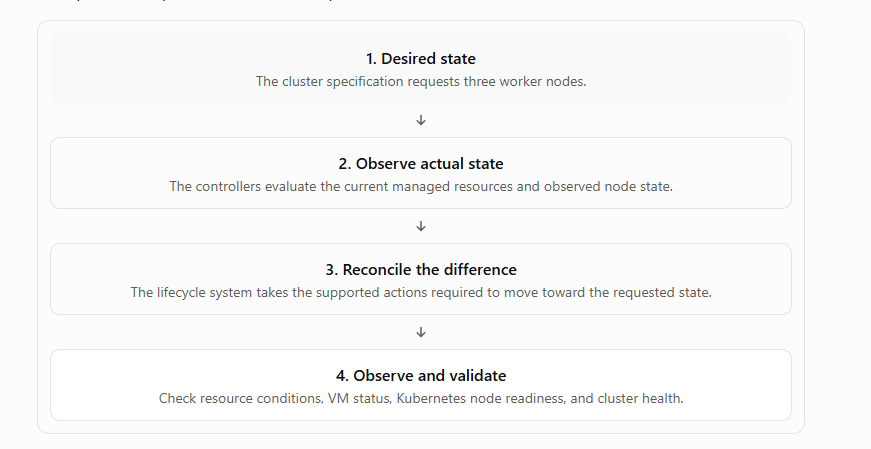
This is a simplified illustration of declarative reconciliation, not a guarantee that every failure will be repaired automatically. Recovery depends on the resource type, controller behavior, infrastructure health, and supported configuration.
Declarative Scaling and Version Changes
Declarative lifecycle management also supports changes to an existing cluster.
For example, an authorized administrator may request an increase in worker-node replicas. The relevant controllers then coordinate the required infrastructure and cluster changes.
Similarly, a supported Kubernetes version change can initiate a lifecycle workflow involving the control plane, worker nodes, and associated components.
These operations must be planned carefully. Changing a replica count or release version does not remove the need for capacity checks, compatibility validation, workload disruption planning, or post-change testing.
For production environments, the cluster specification should be treated as an important record of intended configuration, with appropriate review and change-control procedures.
5. What Happens When a VKS Cluster Is Created?
Understanding the cluster creation workflow helps connect the individual architecture components into one operational sequence.
Although the exact implementation details vary by release and configuration, the overall process can be understood through the following stages.
Step 1: A kubectl/YAML Request Is Submitted
An authorized user prepares the supported cluster specification and submits it through the appropriate API endpoint.
The specification identifies the requested cluster configuration, including the topology, Kubernetes release, node counts, and other required settings.
Before submission, the user should verify that the requested release, VM classes, storage configuration, networking options, and resource allocations are supported and available.
Step 2: The Supervisor API Receives the Request
The request is processed in the appropriate platform context.
Access permissions and configured resource boundaries determine whether the consumer is authorized to request the resources. The platform must also have the necessary capacity and supporting configuration.
If the request is invalid or references unavailable resources, the provisioning process may fail before the cluster reaches a usable state.
Step 3: Cluster API Controllers Process the Desired State
The cluster lifecycle components evaluate the requested configuration and coordinate the required resources.
The controllers work toward the requested topology and track the status of the managed objects. They may need to coordinate multiple dependent operations rather than completing the entire cluster in one action.
This is why checking the cluster resource’s status and conditions is important during deployment.
Step 4: Infrastructure Resources Are Provisioned
The platform provisions the virtualized infrastructure needed for the cluster according to the supported configuration.
This includes the required control-plane and worker-node virtual machines, along with their configured compute, networking, and storage resources.
The precise controller and service interactions depend on the deployed release; administrators should use the official product documentation and observed resource states to investigate the actual workflow.
Step 5: Control-Plane VMs Are Initialized
The control plane must initialize sufficiently for Kubernetes cluster management to operate.
Its readiness depends on the configured topology, VM availability, network connectivity, the health of Kubernetes control-plane components, and other prerequisites.
A running VM alone is not proof that its control plane is ready.
Step 6: Worker VMs Are Provisioned
The requested worker-node infrastructure is brought into the cluster.
The worker nodes must initialize correctly and become able to communicate with the control plane. Resource shortages, IP allocation issues, network configuration errors, or guest initialization failures can prevent this process from completing successfully.
The expected node count should be compared with the requested replica count.
Step 7: CNI/CSI/CPI Initialization
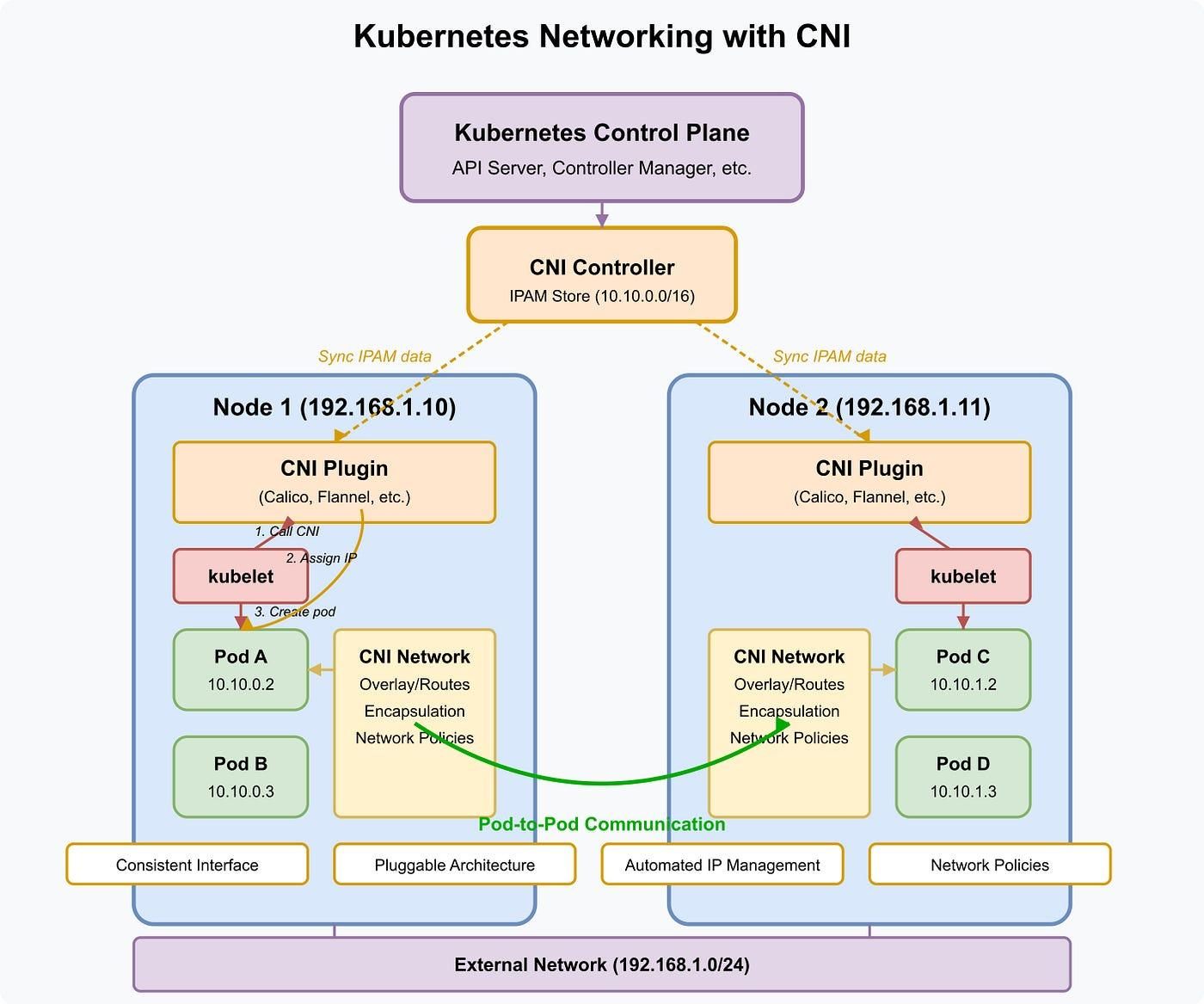
Networking, storage, and cloud integration are important parts of making a newly provisioned cluster operational.
CNI — Container Network Interface
Provides the integration through which Kubernetes workloads receive networking. The selected and supported networking configuration affects pod connectivity, network policy capabilities, and traffic flow.
CSI — Container Storage Interface
Provides the integration between Kubernetes persistent-storage operations and supported storage systems. Actual storage provisioning depends on the available drivers, storage classes, policies, and backend health.
CPI — Cloud Provider Interface
Integrates Kubernetes with the relevant infrastructure provider functionality. Depending on the supported implementation, this can support infrastructure-aware operations such as node or topology information and related cloud integration.
The exact component packaging, installation sequence, and status indicators depend on the VKS release and configuration. These integrations should be validated using the actual resources and documentation for the deployed environment.
Step 8: Cluster Readiness Is Validated
Once the provisioning and initialization workflows have progressed sufficiently, the cluster should be validated before it is used for application workloads.
Useful checks include:
- The cluster reports an appropriate ready condition.
- The expected control-plane and worker nodes are present.
- Kubernetes nodes report
Ready. - System pods are healthy.
- Networking behaves as expected.
- Required storage classes are available.
- Test workloads can be scheduled and reach their required services.
A cluster should not be considered production-ready simply because its initial creation request was accepted.
Complete Cluster Provisioning Workflow
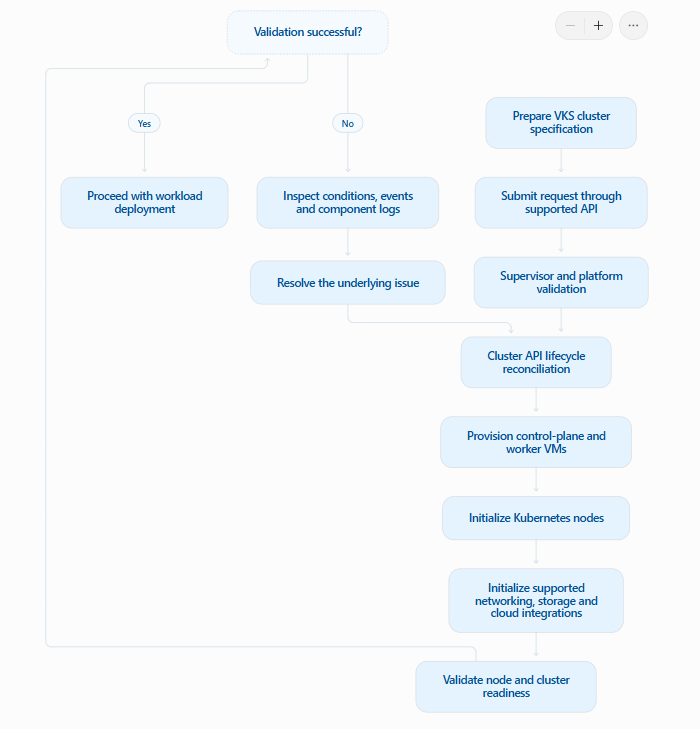
The diagram represents the high-level operational flow. It is not a claim that every internal operation occurs strictly sequentially; some initialization and provisioning activities may overlap.
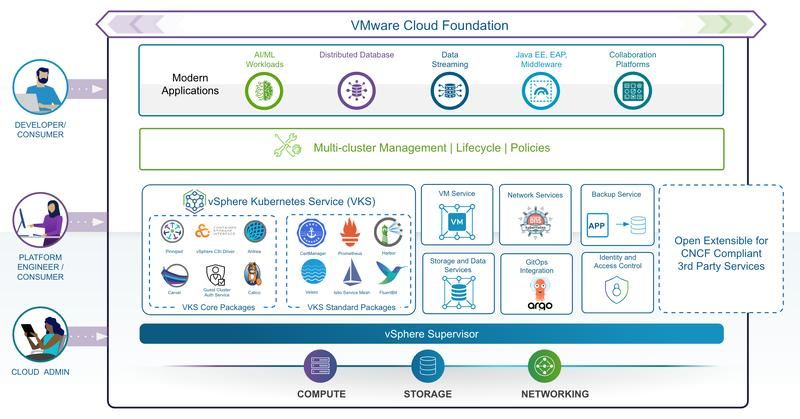
Architecture Diagram: VKS on VMware Cloud Foundation 9.1
The following diagram brings together the major components described throughout this article.
Diagram note: This is a conceptual architecture. It emphasizes logical relationships rather than prescribing every deployment-specific API or internal service dependency.
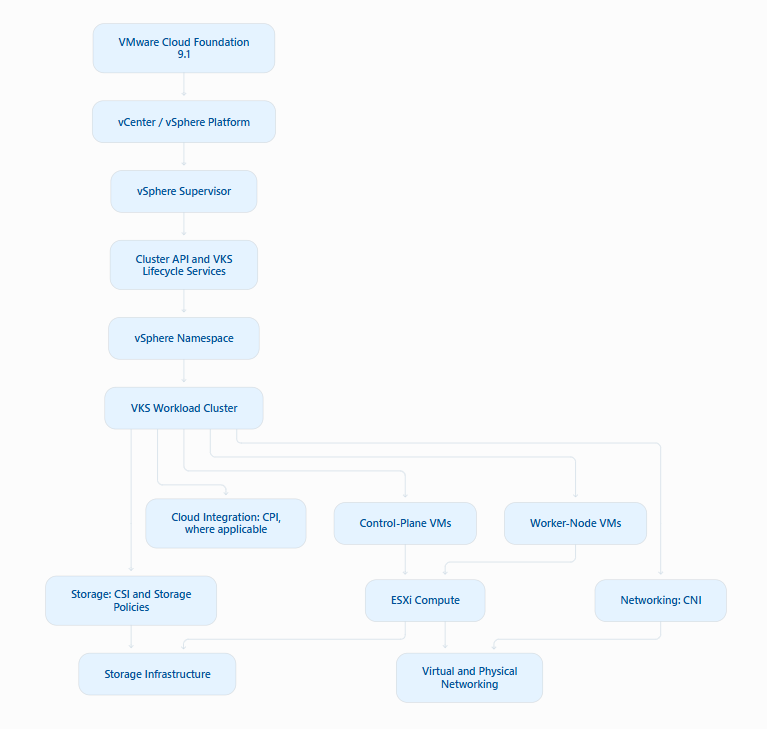
The key idea is that VKS is not simply a set of Kubernetes virtual machines. It is a managed cluster lifecycle integrated with the platform’s APIs, governance, compute, networking, and storage.
6. VKS Release Architecture
Kubernetes clusters evolve independently of the applications running on them. New releases introduce capabilities and fixes, while older releases eventually reach the end of their supported lifecycle.
For enterprise environments, this creates an important operational requirement: Kubernetes versions must be managed deliberately rather than treated as a one-time deployment choice.
Understanding VKrs
A vSphere Kubernetes Release (VKr) identifies a Kubernetes release made available through the VKS platform.
When planning a cluster, administrators need to confirm that the selected VKr is available and supported for their environment and that the associated configuration is compatible with the required platform capabilities.
Important considerations include:
- Kubernetes version availability and support status.
- Compatibility with the deployed VKS and VCF environment.
- Supported cluster topology and configuration variables.
- Compatibility of networking, storage, and other integrated components.
- Application compatibility with the target Kubernetes version.
- Upgrade requirements and any release-specific limitations.
A release being visible in an environment should not automatically be interpreted as evidence that it is the correct target for every cluster.
Why the Kubernetes Release Lifecycle Is Partly Decoupled from the Core VCF Lifecycle
VCF includes infrastructure and platform components with their own upgrade and maintenance requirements. Kubernetes workload clusters also have a lifecycle that must respond to application requirements and Kubernetes release changes.
Decoupling these lifecycle considerations allows platform teams to plan supported Kubernetes release changes separately from the broader infrastructure lifecycle where the product supports that approach.
This distinction does not mean the two lifecycles have no dependencies. A Kubernetes upgrade can still depend on the platform version, supported release combinations, networking and storage integrations, and other compatibility requirements.
For this reason, lifecycle planning should include both a platform compatibility check and a workload upgrade plan.
A Practical Lifecycle Example
Consider an organization operating separate development, test, and production clusters.
The platform team may first validate a new supported Kubernetes release in a non-production environment. It can then run application tests, confirm that required integrations work, and investigate any issues before scheduling a production change.
The production upgrade can subsequently follow the organization’s maintenance windows, change approvals, backup requirements, and workload validation procedures.
The exact sequence and upgrade mechanisms must follow the supported VKS release documentation. A generic version-change procedure should not be assumed to apply to every cluster.
Release Lifecycle: Key Design Considerations
| Design area | Question to answer |
|---|---|
| Release selection | Is the target VKr supported for this platform and cluster configuration? |
| Application compatibility | Have application dependencies and APIs been checked against the target Kubernetes version? |
| Networking | Are the configured CNI and relevant network integrations compatible? |
| Storage | Are required CSI integrations and storage workflows supported? |
| Availability | Can workloads tolerate the planned node and control-plane operations? |
| Validation | What tests will confirm that the cluster and applications remain healthy? |
| Rollback and recovery | What recovery options are supported if the upgrade cannot be completed successfully? |
| Governance | Who approves and performs the upgrade, and how is the change recorded? |
These considerations lead directly into Article 4 of the series, which will explore VKrs, asynchronous releases, upgrades, and Day-2 operations in greater detail.
7. Hands-On Lab: Explore an Existing VKS Environment
The objective of this lab is to explore an existing VKS environment and understand how the platform exposes cluster resources, virtual machines, VM classes, storage classes, and Kubernetes workload information.
This is an inspection lab. It does not create, modify, upgrade, or delete clusters.
Lab Prerequisites
Before starting, confirm that:
- You have access to an existing VKS environment.
- Your
kubectlclient is installed and configured. - You have the appropriate permissions for the resources you want to inspect.
- You can distinguish between the Supervisor context and the workload-cluster context.
- The relevant APIs and resource types are available in your environment.
The commands below are read-only queries. Their availability and output depend on the current context, permissions, installed APIs, and VKS release.
Step 1: Explore vSphere Namespaces
Run the following command in the appropriate Supervisor context:
kubectl get namespacesThis lists the namespaces visible through the current Kubernetes API context.
In a Supervisor context, these are platform-level namespaces. In a workload-cluster context, they are Kubernetes namespaces within that cluster.
What to look for: Confirm that the current context is the one you intended to inspect and identify the namespaces visible to your account.
Step 2: Inspect Cluster Resources
<> Bash

kubectl get clusters
This requests resources of the clusters type in the current context.
If the relevant Cluster API resource is available and your account has permission to list it, the output can help you identify cluster objects and inspect their reported status.
If the command returns No resources found, that does not necessarily mean the environment has no VKS clusters. Check the active context, namespace scope, resource type, and permissions.
Step 3: Inspect Virtual Machines
<> Bash

kubectl get virtualmachines
This command works only where the corresponding virtualmachines resource is registered and accessible.
Use the result to inspect the virtual-machine resources visible through the current API. Do not assume that every VM in vCenter is represented in the current Kubernetes context.
Step 4: Inspect Available VM Classes
<> Bash

kubectl get virtualmachineclasses
This lists the VM class resources visible in the current context, if that resource type is available.
VM classes are useful when reviewing the compute configurations that consumers can request. Confirm which classes are available and whether their permitted configurations match the intended workload requirements.
Step 5: Inspect Storage Classes
<> Bash

kubectl get storageclasses
This displays the storage classes visible to the current Kubernetes context.
Review the class names and, where permitted, inspect the configuration of an individual class:
kubectl describe storageclass <storage-class-name>The placeholder must be replaced with an actual storage class name.
A storage class being present does not prove that every storage operation will succeed. Storage provisioning also depends on the associated driver, policy, backend, and permissions.
Step 6: Inspect the Workload Cluster
Switch to the intended workload-cluster context using your organization’s approved access procedure. Then run the following commands.
Check Kubernetes nodes
<> Bash

kubectl get nodes -o wide
This shows the nodes visible to the workload cluster, including their readiness status, roles, Kubernetes versions, and network information where available.
Look for nodes that report Ready. Any node that is NotReady should be investigated before proceeding.
Inspect pods across namespaces
<> Bash

kubectl get pods -A
This lists pods across the namespaces visible to your account.
Review their status, restarts, and readiness information. System pods may need additional inspection if networking, storage, or other cluster services are not healthy.
Check storage classes
<> Bash

kubectl get storageclass
This checks storage classes from the workload-cluster perspective. Compare these results with the storage configuration intended for the workload cluster.
Inspect CustomResourceDefinitions
<> Bash

kubectl get crd
CustomResourceDefinitions (CRDs) extend the Kubernetes API with additional resource types.
The output can help identify APIs installed in the workload cluster, including those associated with supported platform integrations and add-ons.
Do not assume that every CRD listed is managed directly by VKS; the cluster may contain additional operators and extensions.
Lab Validation Checklist
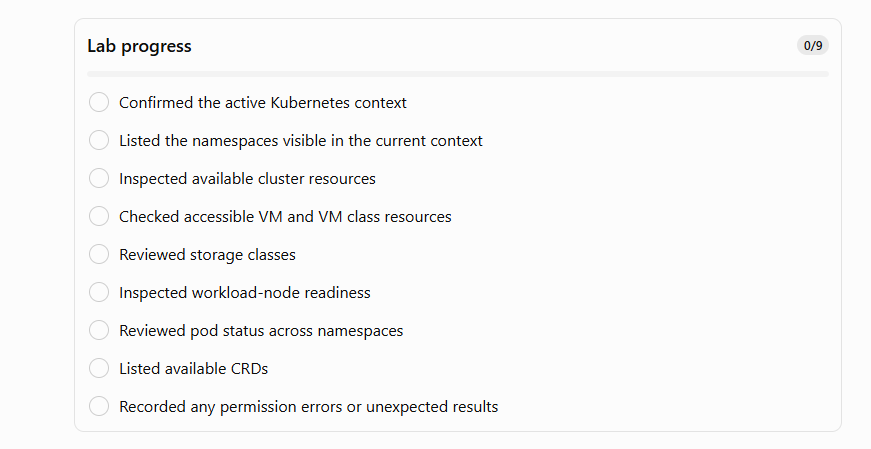
Expected outcome: By the end of the lab, you should have a clearer understanding of the resources exposed by the current API context, the relationship between platform and workload-cluster operations, and the initial checks needed to assess cluster health.
Record actual output from your own lab before including screenshots or command results in the published article.
8. Troubleshooting and Validation
Understanding the architecture becomes especially useful when cluster provisioning or workload initialization does not complete as expected.
The following table provides a starting point for investigating common symptoms. These are diagnostic possibilities, not claims that a particular failure has occurred in your environment.
| Symptom | Areas to investigate | Initial checks |
|---|---|---|
| Cluster does not become ready | Cluster conditions, resource provisioning, platform capacity | kubectl get clusters and kubectl describe cluster <cluster-name> where supported |
| Expected VM is missing | Cluster lifecycle resources, provisioning events, permissions | Inspect cluster conditions and accessible VM resources |
Node reports NotReady | Node conditions, kubelet, node networking, initialization | kubectl describe node <node-name> |
| System pods are unhealthy | Pod events, image availability, CNI/CSI initialization | kubectl get pods -A and kubectl describe pod <pod-name> -n <namespace> |
| Persistent volume provisioning fails | Storage class, CSI integration, storage policy and backend | kubectl get storageclass and kubectl describe pvc <pvc-name> -n <namespace> |
| A resource type is not recognized | Current context, installed API, CRDs and permissions | kubectl config current-context and kubectl api-resources |
Replace the placeholders with the relevant resource names.
A Structured Troubleshooting Approach
When investigating an issue, work through the layers instead of assuming that every failure originates in Kubernetes.
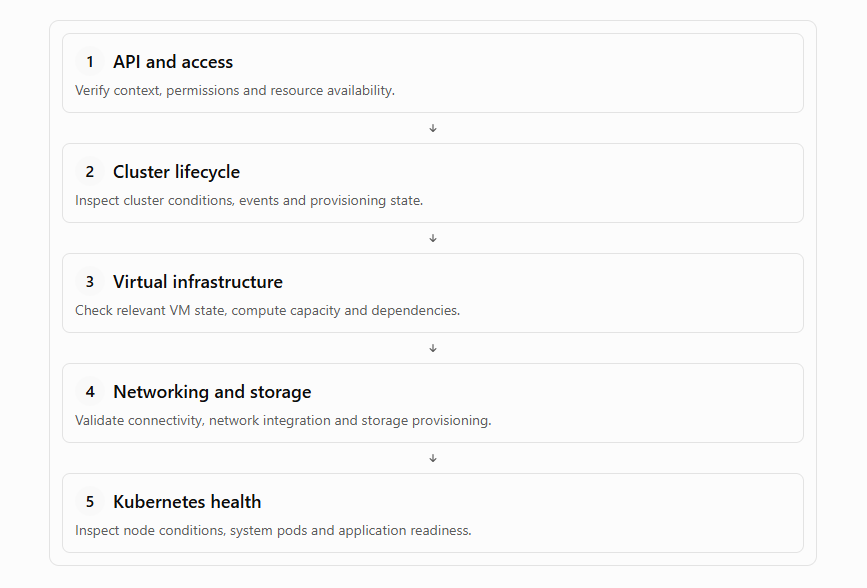
This approach helps distinguish API access problems from infrastructure provisioning failures, integration issues, and application-level symptoms.
For production troubleshooting, use the relevant platform events, controller logs, infrastructure monitoring, and official product guidance. Avoid changing managed resources manually unless the documented procedure explicitly calls for it.
9. Key Takeaways
VKS on VMware Cloud Foundation 9.1 combines Kubernetes cluster lifecycle management with the infrastructure capabilities of the vSphere platform.
The most important architectural concepts from this article are:
- VCF provides the private-cloud foundation. It brings together the platform components and infrastructure required to run modern workloads.
- The Supervisor provides the platform management context. It enables supported services and workload-cluster consumption within the configured governance model.
- VKS provides Kubernetes cluster lifecycle capabilities. Authorized consumers can declaratively provision and manage supported workload clusters.
- Cluster API supports declarative lifecycle management. Controllers work toward the desired cluster state rather than relying entirely on manual infrastructure operations.
- Virtual machines provide the node infrastructure. vSphere capabilities can support resource allocation, placement, and infrastructure availability, subject to configuration.
- The Supervisor and workload cluster have different responsibilities. Platform-level resource governance and application-level Kubernetes administration should remain clearly separated.
- Networking, storage, and cloud integrations are essential. A cluster is not ready for production merely because its virtual machines have been created.
- VKr selection is an architectural decision. Release compatibility, lifecycle support, and application validation must be considered before deployment or upgrade.
The central lesson is that understanding VKS requires both infrastructure and Kubernetes knowledge. The platform’s value comes from integrating these layers while preserving clear operational responsibilities.
10. What I Learned
This section should make the article practitioner-led rather than simply reproducing product documentation.
Use the following as a draft, then adapt it to reflect what you actually observed in your lab.
Working through the VKS architecture highlights how much of Kubernetes operations depends on the infrastructure beneath the cluster. Looking at the Supervisor, Cluster API resources, virtual machines, storage classes, and workload-node state provides a more complete picture than inspecting Kubernetes resources alone.
One important lesson is the distinction between requesting a cluster and validating a usable cluster. A successful API request is only the beginning of the workflow. The underlying resources must be provisioned correctly, the control plane and worker nodes must initialize, and the required integrations must be healthy.
Another lesson is the importance of separating platform administration from workload administration. Clear ownership makes it easier to establish access boundaries, troubleshoot problems, and define repeatable operational procedures.
Finally, declarative lifecycle management makes the desired cluster configuration easier to reason about, but it does not remove the need for compatibility checks, capacity planning, monitoring, and controlled changes.
Before publishing this section: Add one or two specific observations from your actual lab, such as an unexpected resource state, a useful troubleshooting command, or a difference between the Supervisor and workload-cluster contexts. Remove any statement that does not reflect your experience.